
Instruction Manual



PROGRAM STEPS
MILLPWR
®
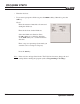
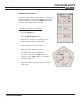
• Enter the X- and Y-axes coordinates for the 1
ST
corner
into the "From" field.
• In the “Size” field, enter the lengths along the X- and
Y-axes.
• Enter the depth of the cut.
• In the "Holes" field, enter the number of holes
you want to include along the X- and Y-axes.
• If you would like to program a 2
ND
corner, hole spacing
and/or tilt angle, press the
MORE softkey. Otherwise,
press the
USE key.
2
ND
Corner
Enter the X- and Y-axes coordinates for the 2
ND
corner (located diagonally from the 1
ST
corner).
Hole Spacing
Specify the hole spacing between holes along the X-
and Y-axes.
Tilt Angle
Enter a tilt angle, if needed.
Press the
USE key.
Note:
If the tool size and type listed in the "Tool" field are incorrect, change the tool
settings before running the program (refer to Programming a Tool Step).
Operation Manual
5-30