
Instruction Manual



PROGRAM STEPS
MILLPWR
®
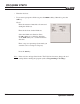
• Enter the feed rate.
• If you want to program a finish cut, press the MORE softkey. Otherwise, press the
USE key.
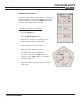
Finish
Enter the amount of material to be removed
during the finish cut.
Enter the feed rate for the finish cut.
Select the finish cut's direction. Press
the
CW softkey for a clockwise direction
or the
CCW softkey for a counter-clockwise
direction.
Enter a step over percentage (how much you
want the tool to overlap on each pass).
Press the
USE key.
Note:
If the tool size and type listed in the "Tool" field are incorrect, change the tool
settings before running the program (refer to Programming a Tool Step).
Operation Manual
5-22