
User Manual



WPB3000 Powerline Wireless Network Extender User Manual
18
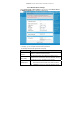
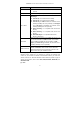
Field Description
Extender does not broadcast its SSID on the wireless
network.
Country Select the country where you are from the drop-down list.
802.11 Mode
Select the appropriate wireless mode. The default is Mixed
802.11b/g/n.
802.11b only: The maximum rate is 11Mbps.
802.11g only: The maximum rate is 54Mbps.
802.11n only: For 20M bandwidth, the maximum rate is
130Mbps (150Mbps for short preamble); for 40M Upper
(+) or 40M Lower (-) bandwidth, the maximum rate is
270Mbps (300Mbps for short preamble).
Mixed 802.11b/g: It is compatible with 802.11b and
802.11g.
Mixed 802.11n/g: It is compatible with 802.11n and
802.11g.
Mixed 802.11b/g/n: It is compatible with 802.11b,
802.11n, and 802.11g.
Band Width
Only in the 802.11 mode that is compatible with 802.11n, can
you set the band width. For 20M bandwidth, the maximum
rate is 130Mbps (150Mbps for short preamble); for 40M
Upper (+) or 40M Lower (-) bandwidth, the maximum rate is
270Mbps (300Mbps for short preamble).
Wireless Channel
Select the working channel of the wireless network. The
default is Auto Scan, which indicates that the Powerline
Wireless Network Extender automatically searches for the
best channel among the available channels.
In this page, you can also configure the wireless security parameters.
Wireless security settings are very important in protecting the wireless base
stations on your network and wireless communication between your router and
wireless network. The Powerline Wireless Network Extender provides 5 types of
wireless security modes, which contain None, WEP, WPA-PSK, WPA2-PSK, and
WPA/WPA2-PSK.
(1) None