
User Manual



WPB3000 Powerline Wireless Network Extender User Manual
17
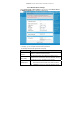
5.3.1.1 Wireless Basic Settings
Choose Wirelss Setup > Wireless Basic on the left pane or click Wireless Basic in
the WIRELESS SETUP page to display the following page.
In this page, you can configure the basic wireless parameters.
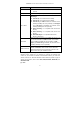
The following table describes parameters in this page:
Field Description
Enable Wireless
Interface
Enable or disable the wireless interface.
Wireless Network
Name (SSID)
The wireless network name (SSID) can contain up to 32
characters and can be letters, numerals, underlines, and any
combinations of them. The SSID is case-sensitive.
Visibility Status
If Visible is selected, the Powerline Wireless Network
Extender broadcasts its SSID on the wireless network.
If Invisible is selected, the Powerline Wireless Network