
User's Guide





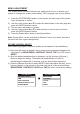
Table Of Contents

22. SETUP
Press to display the Setup menu which allows the user to change the DVD
player options such as LANGUAGE, VIDEO, RATING & MISC. Refer to the
settings and adjustments section for more information.
23. SUBTITLE
Press to display and select the subtitle language in DVD mode. Each time you
press the button, the subtitle language changes.
Note: The type and number of languages for subtitle vary from disc to disc.
24. REPEAT
Allows the user to repeat a selected CHAPTER, TITLE, ALL or OFF.
25. DISC MENU
Allow the user to access the DISC’S menu mode.
26. ZOOM
Press this button to enlarge the picture when playing a DVD disc.
Press ZOOM button DVD player perform
Once ZOOM 2 X - Enlarge the picture 2 times of the original size
Second ZOOM 3 X - Enlarge the picture 3 times of the original size
Third ZOOM 4 X - Enlarge the picture 4 times of the original size
Forth ZOOM 1/2 of the original size
Fifth ZOOM 1/3 of the original size
Sixth ZOOM 1/4 of the original size
Seventh Picture is returned to original size
27. VOLUME DOWN (-) or UP (+)
Press to decrease or increase the level of the picture adjustments. Press to
decrease or increase the volume of the wired headphones. The volume also
use to adjust the picture setting level after the picture select button is pressed.
28. DVD Mode Select Button
Switches certain function keys on the remote control for DVD function.
29. MUTE
Press this button to mute the audio for wireless FMM, IR headphones and wired
headphones.
Pressing the button again restores the sound to the previously set level.
30. EJECT ()*
This button is used to eject the disc.
- Reduce the picture to 1/2
- Reduce the picture to 1/3
- Reduce the picture to 1/4
9