
User's Guide


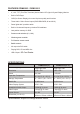

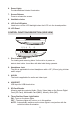


Table Of Contents

CONTROLS AND INDICATORS DIAGRAM (FRONT VIEW)
1. POWER ( ) Control
Used to turn the system on/off (standby).
2. PLAY (u) Control
This control is used to start playback of a disc.
3. Source Select (S)
Use to select one of the two sources: DVD/USB/CARD, AV and AUX.
4. STOP (n) Control
- Press STOP once : Stops playback,
Pressing the PLAY button again will resume normal playback from where
movie was stopped.
- Press STOP twice and then press PLAY to start playback
from the beginning of the DVD.
5. EJECT () Control
This control is used for ejecting disc from the disc compartment.
(Note: Disc can be ejected with the unit turned Off. Vehicle ignition must be in
Run or ACC position). After the disc is removed the unit will turn Off after 15-20
seconds.
4
1
6
3
4
5
2
6
7
8
8
9
10