
User's Manual





13
Region 1- USA, Canada
Region 2- Japan, Europe, South Africa, Middle East, Greenland
Region 3- S. Korea, Taiwan, Hong Kong, Parts of South East Asia
Region 4- Australia, New Zealand, Latin America (including Mexico)
Region 5- Eastern Europe, Russia, India, Africa
Region 6- China
Selecting Folders and Songs
Selecting a Play Mode
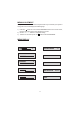
When an MP3 is loaded in the player, the navigation menu appears automatically.
1. Press or to move the highlight to the desired folder and press ENTER to
display the songs in the folder.
2. Press or to move the highlight to the desired folder and press ENTER to
begin playback of the highlighted song.
You can choose what order the songs will play on a disc temporarily. The default
play mode is FOLDER. Press REPEAT consecutively to choose the desired play
mode. The play mode options are :
• Repeat One Repeat the song that is playing.
• Repeat All Repeat the disc that is playing.
• Repeat Off Turn off repeat function.
pq
pq