Revision: 1.0 AR-R8601 Installation Guide Revision 1.
Revision: 1.0 Contents 1 Introduction to AR-R8601...............................................................................................3 1.1 Specifications ..........................................................................................................3 1.2 Packing List ............................................................................................................4 1.3 System Dissection .........................................................................................
Revision: 1.0 1 Introduction to AR-R8601 Acrosser's Rackmount Networking device AR-R8601 is a cost-effective and entry-level solution, which is suitable for small office. Base on VIA CN700 with ULV Eden 1600MHz CPU, the AR-R8601 general very low heat. We also put a quiet Fan to keep the low noise which will not cause uncomfortable voice. By three 10/100 Lans, the AR-R8601 is sufficient for the small business security hardware solution. Key features: 1. VIA EDEN ULV 1600 CPU. 2.
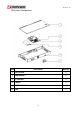
Revision: 1.0 1.2 Packing List Description Quantity AR-R8601 1 Console cable 1 Software driver CD 1 Quick user’s manual 1 Power cord 1 1.
Revision: 1.
Revision: 1.
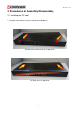
Revision: 1.0 2 Procedures of Assembly/Disassembly 2.1 Installing the CF card. 1. Unfasten two screws of chassis top cover and open it.
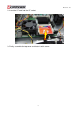
Revision: 1.0 2. Insert the CF card into the CF socket. 3. Finally, assemble the top cover and fasten it with screws.