
Manual



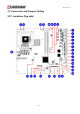
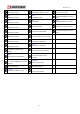
Table Of Contents
- AR-R5800 System
- 1.1 Specifications
- 1.2 Packing List
- 1.3 System Dissection
- 2.1 2.5” HDD Installation
- 2.2 CF Card Installation
- 2.3 Power Cord Hook Installation
- 2.4 PCIe Card Installation
- 2.5 Rack Bracket Installation
- 1.1 Specifications
- 1.2 Package Contents
- 1.3 Block Diagram
- 2.1 Locations (Top side)
- 2.2 Connectors and Jumper Setting
- 2.3 Connector and Jumper Setting
- Date Setup
- Time Setup
- IDE Channel 0 Master
- SATA Channel 1/2
- Halt On
- Quick Power On Self Test
- Full Screen Logo Show
- APIC Mode
- Pre-allocated Memory Size
- DVMT Mode
- Console Redirection
- Baud Rate
- LAN Bypass Function
- Reset Configuration Data
- Resources Controlled By
- IRQ Resources
- Onboard Serial Port 1
- Onboard Serial Port 2
- USB Device Setting
- USB 1.0 Controller
- USB 2.0 Controller
- USB Operation Mode
- USB Keyboard Function
- USB Storage Function
- First / Second / Third Boot Device/Other Boot Device
- LAN Boot Select
- Hard Disk Boot Priority
- Save & Exit Setup
- Load Optimized Defaults
- Exit Without Saving
- Set Password

Revision: 1.0
Memory: one Kingston KVR1333D3N9/2G.
One 3.5” HDD
OS: Windows XP SP3.
Processor was running at 100% loading.
Note: A proper power supply unit choice means that we should consider at least about
a.) Protection of overload, short-circuit, and other safeties.
b.) Summation of all devices’ power requirements.
c.) Thermal de-rating.
Operating Temperature: 0℃ ~ 60℃
1.2 Package Contents
Check if the following items are included in the package.
In addition to this User's Manual, the AR-B5800 package includes the following items:
A quick setup manual.
One AR-B5800 networking board.
One Software utility CD.
One adaptable cable for COM1.
One D-SUB-15 adaptable cable for VGA.
One SATA cable.
One USB adaptable cable. (Optional) (ACROSSER’s P/N.190030779-G)
25