Owner's manual
Manuals
Brands
Acrosser Manuals
Computer Accessories
AR-ES5890
11
12
13
14
15
16
17
18
19
20
Revision: 1.0
16
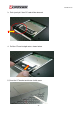
2.4 Installing the 2.5” Hard D
isk Driver (HDD)
1. Put the HDD on the bracket of top cover
.
2. Fasten four screws with screw driver
.
1
...
...
14
15
16
17
18
19
...
20