
User Guide


Acronis True Image SDK
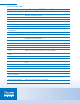
Acronis True Image SDK Features Table
Programming Languages Support
Script languages Any script language is supported including the most common ones such as
VBScript, JavaScript and others
Compiler languages C#
Remote Capabilities
Acronis True Image Agent Connect to a remote computer in your network
Remote backup Backup the data and the operating system on remote computers
Remote recovery Recover the operating system and all data on remote computers in your network
Remote operations with
disk partitions
Create, resize, delete, and move partitions on remote computers
Operation progress status View the status of scheduled tasks on remote computers
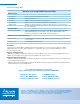
System Protection
Backup Acronis True Image provides two options: 1) image an entire disk or partition or 2)
backup specific files and folders
Create incremental backup Backup only changes since the last backup
Create differential backup Backup changes since the last full backup
Exclude files Exclude specific types of files from the file/folder backup option
Compress backups Select from 1 of 4 compression levels when creating backup files
Create Acronis Secure
Zone
Create the Acronis Secure Zone. The Acronis Secure Zone is a special hidden
partition on a local system where you can store backups
Manage Acronis Secure
Zone
Allows you to resize and delete the Acronis Secure Zone
Validate backup file Checks backup file for errors
Online Protection
Throttling Set hard disk writing speed, CPU priority, or network bandwidth during backup
tasks
Online database backup Talk to the VSS service to allow databases to be imaged while online
Recovery
Recover image Recover an entire disk or a specific partition
Recover files/folders Recover specific files and folders
Activate the Acronis Startup
Recovery Manager
Allows a failed system to be booted by selecting the F11 key
Use Acronis Snap Restore Boot a system from an image
Acronis Universal Restore Restore an entire system to new hardware