
Operation Manual





7.3 Deleting a backup location
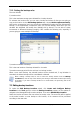
To invoke the Delete Backup Location wizard, click Create and Configure Backup
Locations in the Tools group or select the Backup Locations category on the sidebar to
navigate to the Manage Backup Locations window. Then select Delete Backup Location.
Select a location. Expanding it in the folder tree will display the location contents. If you
want to delete all archives stored there, check Remove Archive Contents. Otherwise the
location will become a common folder and you will be able to access the archives using any
file manager.
Then select Next, read the summary and click Proceed. The operation will be performed
without a prompt.
Copyright © Acronis, Inc., 2000-2007 49