
Operation Manual

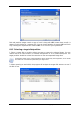




input the command, its arguments and working directory or browse folders to find a batch
file.
Please do not try to execute interactive commands, i.e. commands that require user input.
These are not supported.
Unchecking the Do not perform operations until the commands execution is
complete box, checked by default, will permit the restore procedure to run concurrently
with your commands execution.
6.4.3 Restoration priority
The preset is Low.
The priority of any process running in a system determines the amount of CPU usage and
system resources allocated to that process. Decreasing the restoration priority will free more
resources for other CPU tasks. Raising restoration priority may speed up the restore process
as it takes resources from other currently running processes. The effect will depend on total
CPU usage and other factors.
6.4.4 File-level security settings
The preset is Restore files with their security settings.
If the file security settings were preserved during backup (see
5.3 7 File-level security
settings), you can choose whether to restore them or let the files inherit the security settings
of the folder where they will be restored.
.
This option is effective only when restoring files from file/folder archives.
6.4.5 Additional settings
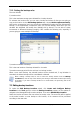
1. You can choose whether to restore file date and time from the archive or assign the files
the current date and time.
2. Before data is restored from the archive, Acronis True Image Home can check its integrity.
If you suspect that the archive might have been corrupted, select Validate backup
archive before restoration.
To check archive data integrity you must have all incremental and differential backups
belonging to the archive and the initial full backup. If any of successive backups is missing,
validation is not possible.
3. Having restored a disk/partition from an image, Acronis True Image Home can check the
integrity of the file system. To do so, select Check file system after restoration.
Verification of the file system is available only when restoring disk/partitions using FAT16/32
and NTFS file systems.
46 Copyright © Acronis, Inc., 2000-2007