
Operation Manual


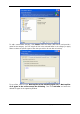




You can select the following items:
Messages contained in.PST/.DBX Database Files
E-mail accounts
For Microsoft Office Outlook 2000, 2002, 2003
Mail Folders
Calendar
Contacts
Tasks
Notes
Signatures
News Folders
User Settings
Address Book
For Microsoft Outlook Express
Mail Folders
Address Book (select Windows Address Book).
Acronis True Image Home provides backup of IMAP (Internet Messages Access Protocol)
mail folders for Microsoft Outlook. It means that you can back up folders stored on a mail
server. For Microsoft Outlook Express, only local e-mail folders backup is available.
5.2.5 Selecting the backup destination
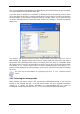
Select the destination place for the backup. If you choice is other than Acronis Secure Zone
or a backup location, specify the archive name.
If you are going to create a new archive (i.e. perform a full backup), enter the new file name
in the Folder line, or use the file name generator (a button to the right of the line). If you
select an existing full backup file, it will be overwritten through a prompt. Overwriting a full
backup means that you discard the entire old archive and start creating a new one. In that
28 Copyright © Acronis, Inc., 2000-2007