
Operation Manual






3. Go to
5 2.5 Selecting the backup
.
.
5.2.4 My E-mail backup
Acronis True Image Home offers a straightforward way to back up messages, accounts and
settings for Microsoft Outlook 2000, 2002, 2003 and Microsoft Outlook Express.
E-mail backup is a subset of file-level backup that backs up predefined folders and requires
minimum user selections. However, if need be, you can select Microsoft Outlook components
and folders individually.
The list of supported e-mail clients will be gradually built up. Updates will be available with
new program builds or via the Internet.
1. Invoke the Create Backup Wizard by clicking on the backup operation icon in the main
program window.
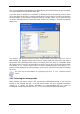
2. Select My E-mail.
3. Select the Microsoft Outlook components and folders to back up.
Copyright © Acronis, Inc., 2000-2007 27