
Operation Manual


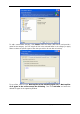




You can apply custom filters, using the common Windows masking rules. For example, to
exclude all files with extension .tmp, add *.tmp mask.
These filter settings will take effect for the current task. For information on how to set the
default filters that will be called each time you select folders to back up, see
5.3.2 Sou ce
files exclusion.
r
.
3. Go to
5 2.5 Selecting the backup
.
5.2.3 My Application Settings backup
Back up custom settings of Windows applications. This is a subset of file-level backup that
backs up predefined folders and requires minimum user selections. The program displays a
list of supported applications that has been found on the computer, sorted by categories.
You can select a random set of categories and applications.
It is important to note, that the program backs up only your settings, but not the application
executable files. If an application seems to malfunction or ceases to run you are supposed to
reinstall it using the last updates and then recover your settings from the backup.
The list of supported applications will be gradually built up. Updates will be available with
new program builds or via the Internet.
For instant messengers, the program will back up both settings and history.
1. Invoke the Create Backup Wizard by clicking on the backup operation icon in the main
program window and select My Application Settings.
Or, you can launch the wizard directly from the desktop. To do so, right-click on the
application label and select Backup in the context menu. In this case, the program will
automatically set My Data mode and mark the application executable file for backup. To
back up the application settings, choose My Application Settings.
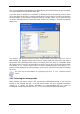
2. Select applications to backup. You can select a random set of categories and applications.
26 Copyright © Acronis, Inc., 2000-2007