
Operation Manual


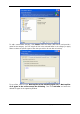


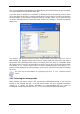


You can select file types
1. By name. Enter the file name in the upper Name field. You can use wildcards and the
common Windows masking rules. For example, My???.exe mask will reject all .exe files
with names consisting of five symbols and starting with “my”.
2. By type. Tick off the desired file types in the list.
3. By extension. Enter the extensions (semicolon separated) in the bottom Extensions field.
If you do not want to keep custom contents of the current backup, simply select the
files/folders from the tree. This set will be effective only for the current backup task.
File filtering can be applied to manually added folders as well. For example, you may want
hidden and system files and folders, as well as files with .~, .tmp and .bak extensions, not
to be stored in the archive.
Copyright © Acronis, Inc., 2000-2007 25