
Operation Manual





Manual Partition Operations
Copyright © Acronis, Inc., 2000–2005
55
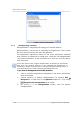
Hard disk clearing parameters window
4. By clicking OK, you'll add a pending operation of hard disk clearing.
Deleting hard disk partitions does not destroy disk sector contents. They can be
restored by special means, if needed. Therefore, if you need to destroy confidential
information, set the switch to
Delete partitions and destroy data!
For information about the Acronis Disk Director Suite data wipin
g
al
g
orithm see the
commentary for 4.1.7 «Deleting a partition».
Deleting a partition in Windows 95/98/Me can chan
g
e the order of letters assi
g
ned to
other partitions. As a result, some shortcuts mi
g
ht stop workin
g
. A detailed
discussion of partition letter assi
g
nment rules for various operatin
g
systems appears
in 3.1 «Creating A New Partition».
4.2 Additional Partition Operations
Additional hard disk partition operations include some rarely used but useful
operations for converting partition file systems, hiding and unhiding
partitions, setting active partitions, changing root size and changing partition
cluster size.
4.2.1 Changing partition letter
Some operating systems assign letters (C:, D:,…) to hard disk partitions at
startup. They are used by applications and operating systems to locate files on
partitions.
Connecting an additional disk, as well as creating or deleting a partition on existing
disks, might change your system configuration. As a result, some applications
might stop working or user files might not be opened. To prevent this, you can
change letters assigned by an operating system.
If you need to change a letter assigned to a partition by an operating
system:
1. Select the hard disk and partition on it.
2. Execute operation of partition letter changing by selecting Disk
Advanced Change Letter or a similar item in the Advanced sidebar list, or
by clicking
Change the logical drive letter on the toolbar.
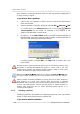
3. Select a new letter in the Change letter window.