
Operation Manual




Automatic Partition Operations
34
Copyright © Acronis, Inc., 2000–2005
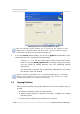
Entering the size to increase partition free space
Note that althou
g
h selected partition size is increased at the expense of other
partition space, unallocated space also will be used if needed. Unallocated space is
automatically considered to be the maximum partition size.
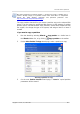
5. In the last Preview wizard window, you will see a graphical representation of the
new partition structure, including the resized partition.
Clicking Finish on the last wizard page will allow Acronis Disk Director
Suite to create the pending operation list for partition resizing (your actions
may only modify an existing operation. See 2.4.5 «Modifying pending
operations»).
The new partition structure will be graphically represented in the Acronis
Disk Director Suite main window.
Similar to creating a new partition (see 3.1 «Creating A New Partition»), Acronis Disk
Director Suite considers the results of partition free space increase as a sin
g
le
complex operation that can be undone only as a whole.
3.3 Copying Partitions
Having copied a partition, you get the duplicate of all its data. Partition copy can
be used:
• As a partition backup (or rather as a data backup)
• A system partition backup is advised if you want to upgrade the existing
operating system
• To quickly move all data from the old disk to the new disk