
Operation Manual




Automatic Partition Operations
28
Copyright © Acronis, Inc., 2000–2005
Windows NT/2000/XP operating systems' initial letter assignment is done
automatically: in Windows NT 3.x it's similar to Windows 95, and in
Windows NT 4.0 and Windows 2000/XP similar to Windows 95OSR/98.
Windows NT 4.0 does not support FAT32, but assigns letters to such
partitions.
Please note that letter order in these operatin
g
systems can differ dependin
g
on
the number of hard disks and other disk drives recognized by the BIOS.
All these operating systems enable you to change initially assigned letters.
Partition create, delete and move operations do not affect letters assigned
to other partitions. Assigning a partition a new letter or hiding it will
prevent only its applications and files from running or opening. Other
partitions will not be affected by these operations.
OS startup problems may appear if you directly change the letter
assigned to the system partition or a partition with PAGEFILE.SYS swap
file.
Hard disk partition letter assi
g
nment in various operatin
g
systems is further
explained in all
g
uide chapters where the partition operations mi
g
ht affect PC
operation or booting.
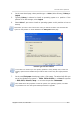
9. On the next page, you can enter an optional partition label that will enable you to
distinguish one created partition from another.
In Windows, a partition label is shown in the Explorer disk and folder tree, for
example, WIN98(C:), WINXP(D:), DATA(E:), etc. WIN98, WINXP and DATA are
partition labels. See also Appendix C «Glossary» — «
Label».
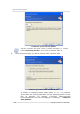
10. The last wizard page graphically shows you the new disk partition structure,
including those just created.
Created partition in the disk partition structure