
Operation Manual





21 Copyright © Acronis International GmbH, 2002-2015
7. Unzip this newly created ZIP file and you'll end up with a folder with the application name.
8. Inside that folder is a file called iTunesMetadata.plist
9. Open this PLIST file in a text editor.
10. Find the softwareVersionBundleId key in the list.
11. The string value below it is the bundle identifier value that you will need to enter for the app in
Acronis Access. These are commonly formatted as: com.companyname.appname
1.2.6 Default Access Restrictions
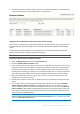
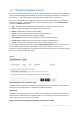
This section allows you to set restrictions for clients contacting the management server and these
restrictions are also the default restrictions for Gateway Servers.
Note: For information on setting custom access restrictions for your Gateway Servers visit the Editing Gateway
Servers (p. 34) article in the Managing Gateway Servers section.
Configure the client enrollment status, client app types and authentication methods that can be used
to connect to this Acronis Access server and any Gateway Servers configured to use the default
access restrictions.