
Operation Manual




80 Copyright © Acronis International GmbH, 2002-2015
Or you could check for updates manually
1. Start the Access Desktop Client.
2. Open the tray Acronis Access app.
3. Select Preferences.
4. In the Acronis Access client version section press Check Now.
5. A windows pops-up showing your current version and the latest (selected by the server) version.
6. Press OK to update.
7. The Acronis Access client installer will launch, then proceed with steps 3 - 6 shown above (under
Using the auto-update).
3.1.3 Mac client
3.1.3.1 Installing and Configuring the Mac Acronis Access Desktop Client
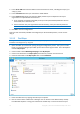
1. Using your web browser, go to the log-in page of your Acronis Access server, for instance
https://myserver_ https://myserver/
2. Log in.
3. Click on your account.