
User manual



2
7-2-13
Initial Set-Up Instructions for the WIZ110SR Board.
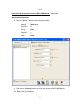
2. After the search is complete:
A. The MAC address of the board will be listed in the board list to the left.
B. The fields to the right will now contain network information.
3. To get an Local IP address assigned automatically, click on the “DHCP”
option button.
4. Click on the “Setting” button, to send new set-up to WIZ110SR board.
5. Click on the “Search” button, to retrieve the new board set-up parameters.
6. To make sure that the Local IP address does not change, click on the
“Static” option button and then repeat steps 4 and 5 above.
7. Enter IP address in the HEM software program under Set-Up tab.
2A
2
B
3
4
5
6