
Service manual






Service Manual Disassembly and repair 43
Power and battery cable disassembly
Follow all the previous steps and then:
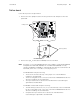
1. Push down on the tab that connects the power cable to the main PCB and pull it
toward the bottom of the Spot Vital Signs.
2. Lift the ferrite from its holder.
3. Use a 3/8” Hex socket to remove the nut from the outside of the transformer
connector. Slide the cable through the rear housing opening.
4. Cut the wire tie and slide the battery connector out of the rear housing to remove the
cable assembly.
Power cable to
main PCB
connection
Ferrite Bead
Wire tie