
Service manual




18 Overview Welch Allyn Spot Vital Signs
DCpower connection
Use the Spot Vital Signs with battery power (after charging the battery) or battery and DC
power supply.
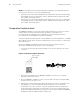
1. Insert the round transformer connector into the DC power connection port on the left
of the Spot Vital Signs (see page 16).
2. Insert the line cord into the line connector on the transformer then plug the power
cord on the transformer into the AC main power source to charge the battery.
Charging the battery
CHARGE THE BATTERY FOR SIXTEEN (16) HOURS PRIOR TO INITIAL USE.
Attach the DC power transformer to the Spot Vital Signs then plug the transformer into
the AC main power source.
While charging, the charger icon remains on and the battery icon segments continuously
sequence. When the battery is fully charged, all battery icon segments display.
As the battery voltage level drops the segments turn off from left to right. If the Spot Vital
Signs is not plugged in to charge when the second last segment is turned off the Spot
Vital Signs issues a warning beep. As the voltage level drops to compromise
measurements an error beep is heard and all other display fields turn off. Spot Vital Signs
beeps at increasingly frequent intervals until it finally powers itself off.
If not used for extended periods of time then recharge the battery.
Standby mode
Standby Mode conserves battery power. When the device is powered up, but has not
been used for 2 minutes, it goes into Standby Mode. “Z Z Z” shows across the top of
the display with no backlight.
To bring the Spot Vital Signs out of Standby Mode, press the Mode or Pressure Preset
button or begin a patient measurement.
Note
To assure proper electrical isolation, replace the AC power transformer/charger
using only the Welch Allyn specified part (REF 5200-101A, 5200-103A, 5200-
103Z).