
Service manual




Service Manual Overview 13
Controls
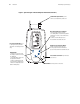
Figure 1. Spot Vital Signs with SureTemp Plus Thermometer (Version 1)
SpO
2
SS
mm g
a
min
M
P
DIA
mm g
a
MODE
C
Power Button: controls power to the device.
Blood Pressure Start/Stop Button:
initiates a new blood pressure cycle.
Pressing again cancels an active blood
pressure measurement and deflates the cuff.
Mode Button:
• holding for 2 seconds while
the display is active turns off/on
the backlight.
• in Standby Mode, recalls the
last patient information.
• with the temperature probe
removed from the probe holder,
switches the temperature from
Oral to Axillary Mode.
Pressure Hose Connector: port for blood
pressure hose.
Thermometer Eject Button: push to
remove used temperature probe cover.
Printer: press to print the
measurements (Version 1 only).
Next Patient/Clear/Cancel Button:
• active display: clears the display.
• in Standby Mode: recalls the last patient
information. Pressing a second time clears
the screen.
• cancels an active blood pressure
measurement and deflates the cuff.