
Specifications





Application note Connecting CP600 to motion products via Modbus RTU AN00200-003
ABB Motion control products 8
www.abb.com/motion
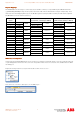
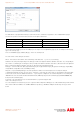
The field tab lets us program which memory location in the motion controller the Tag relates to. The available ‘Memory Type’
selections are specific to the PLC model selected as shown by the table below:
PLC Type Comms Array Net Data
NextMove ES/ESB-2 Yes No
E100 motion product Yes Yes
E150 motion product No Yes
You should ensure that all tags used in the HMI project are setup to use a single Memory Type (i.e. do not attempt to mix memory
types in the same project).
There is a third Memory type available (NO_IP)….this is not currently used.
The other entries on this dialog are as follows:
Offset- - this relates to the index into the Comms Array or Net Data area - e.g. 3 to access Comms(3)
Subindex – this entry varies depending on the data type. For Boolean (bit) level data the subindex can be 0 to 31 (corresponding to
the 32 bits in a commsinteger or netinteger location). For Byte level data the subindex can be 0 to 3 (where 0 is the least significant
byte). For Word level data the subindex can be 0 or 1 (where 0 is the least significant word).
Data type – select from Boolean, Byte (signed 8 bit integer), Short (signed 16 bit integer), Int (signed 32 bit integer), unsignedByte,
unsignedShort, unsignedInt, Float (32 bit IEEE) or String
Arraysize – only used if String data type selected. Specifies the number of characters/bytes to be used by the string. A
commsinteger/netinteger location can store up to 4 characters so if an array size of more than 4 is specified then subsequent data
locations are used to store the additional characters - e.g. If a tag was configured to use Comms Array Offset 1 as a String and
“ABCDEF” was to be stored this would result in 0x41424344 (“ABCD”) being stored in Commsinteger(1) and 0x45460000 (“EF”)
being stored in Commsinteger(2).
Conversion – this entry allows the user to add a translation to (e.g. word swap) the data
Index – this setting is not used.
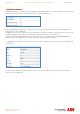
So as an example, if we needed a Tag to use in conjunction with a lamp in the HMI project (i.e. a Boolean/bit value) and we wanted
this to relate to Bit 19 of NetData 2 in our ABB e100 motion product (e.g. NextMove e100) we would setup our Tag as shown
below: