
Specifications





Application note Connecting CP600 to motion products via Modbus RTU AN00200-003
ABB Motion control products 5
www.abb.com/motion
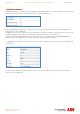
A dropdown control appears under the PLC heading, click on this to display the list of available protocols…
We need to select the ABB Modbus RTU protocol. This is a client (master) protocol that allows the CP600 HMI to communicate
with both ABB PLCs and motion control products. The ABB versions of Modbus protocols differ from the generic Modbus
protocols available in two ways:
1. The ABB Modbus protocols use big endian word order for data encoded into the Modbus data packets
2. The ABB Modbus protocols allow PLC specific addresses to be utilised in preference to generic Modbus registers
Note that there are no ABB specific versions of the Modbus Server protocols (so the CP600 HMI would usually be used as a master
device when connecting to ABB products).
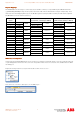
Having selected ABB Modbus RTU the software will now ask us to configure the connected devices…
If the HMI is connected to a single Modbus RTU slave device (e.g. e100 controller or AC500 PLC) there is no need to select the
‘PLC Network’ check box. If there are multiple slave devices connected to the HMI then it is essential this box is selected (for the
purposes of this application note we will select this option).