
Specifications





Application note Connecting CP600 to motion products via Modbus RTU AN00200-003
ABB Motion control products 4
www.abb.com/motion
Register Mappings
Register MappingsRegister Mappings
Register Mappings
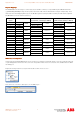
All CP600 Modbus functions target a common data area in the Mint controller (as set by the Mint keyword ModbusParameter
(_mpREGISTER_MAPPING) if using a motion product other than e150 or fixed as Net data when using an e150 product). These
data areas have a fixed mapping with respect to the Modbus registers used by the HMI as shown by the table below (equivalent
AC500 addresses are also shown for reference):
Server Modbus
register
AC500 address Mint Comms array
(Comms=Real, Commsinteger = DWord)
Mint Netdata array
(Netfloat = Real, Netinteger = DWord)
0 %MW0.0
%MD0.0
Invalid
Invalid
Element 0 MSW
Element 0
1 %MW0.1 Invalid Element 0 LSW
2 %MW0.2
%MD0.1
Element 1 MSW
Element 1
Element 1 MSW
Element 1
3 %MW0.3 Element 1 LSW Element 1 LSW
4 %MW0.4
%MD0.2
Element 2 MSW
Element 2
Element 2 MSW
Element 2
5 %MW0.5 Element 2 LSW Element 2 LSW
… --- --- --- --- --- ---
198 %MW0.198
%MD0.99
Element 99 MSW
Element 99
Element 99 MSW
Element 99
199 %MW0.199 Element 99 LSW Element 99 LSW
200 %MW0.200
%MD0.100
Invalid
Invalid
Element 100 MSW
Element 100
201 %MW0.201 Invalid Element 100 LSW
202 %MW0.202
%MD0.101
Invalid
Invalid
Element 101 MSW
Element 101
203 %MW0.203 Invalid Element 101 LSW
… --- --- --- --- --- ---
1996 %MW0.1996
%MD0.998
Invalid
Invalid
Element 998 MSW
Element 998
1997 %MW0.1997 Invalid Element 998 LSW
1998 %MW0.1998
%MD0.999
Invalid
Invalid
Element 999 MSW
Element 999
1999 %MW0.1999 Invalid Element 999 LSW
LSW – Least Significant Word : MSW – Most Significant Word
HMI Protocol Configuration
HMI Protocol ConfigurationHMI Protocol Configuration
HMI Protocol Configuration
Having started Panel Builder 600 and launched a new project you will be presented with a blank screen representing the first page
of your HMI application. At the left of the screen is the “ProjectView” which shows a tree structure of the available functions within
the HMI project.
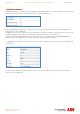
Expand the “Config” folder if necessary and then double-click the “Protocols” icon…
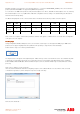
Now click on the “+” button to add a protocol to the HMI project…