
Specifications





Application note Connecting CP600 to motion products via Modbus RTU AN00200-003
ABB Motion control products 3
www.abb.com/motion
e150 Product Configuration
e150 Product Configuratione150 Product Configuration
e150 Product Configuration
All Modbus parameters are configured via the ‘Configuration’ menu within Workbench once online to the product (and the resulting
settings are stored on the product as part of its Mint Device Configuration (MDC) file).
Before enabling Modbus operation it is necessary to set the correct byte and word order to suit the connected Modbus client
(master), in this case the CP600 HMI.
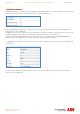
As ABB PLC products use big endian byte order and big endian word order the ‘Configure Communication Interfaces’ page of the
Configuration wizard provides settings (as shown above) to allow the e150 product to operate this way.
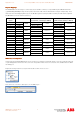
e150 products inherently map Modbus registers onto Net Data (so there is no requirement to use the MODBUSPARAMETER
keyword to initialise this mapping). It is not possible to target the e150’s Comms array via Modbus.
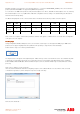
To enable Modbus on e150 select the ‘Serial’ section of the ‘Configure Communication Interfaces’ dialog and select Modbus RTU
as the protocol…
The other settings on this dialog should be made to suit the connection to the HMI (this is detailed later when discussing the
protocol setup in the HMI project).