
Specifications




Application note Connecting CP600 to motion products via Modbus RTU AN00200-003
ABB Motion control products 12
www.abb.com/motion
Physical Connection
Physical ConnectionPhysical Connection
Physical Connection
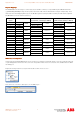
The table below shows the physical connection possibilities for Mint products supporting integrated Modbus protocols. AC500 and
CP600 products are included for reference.
Connection Type NextMove e100 NextMove
ES/ESB-2
MicroFlex e100 MotiFlex e100 AC500 AC500 Eco CP600
RS232 Yes Yes (by variant) No No Yes No Yes
2 wire RS485 No No Yes Yes Yes Yes Yes
4 wire RS422 Yes Yes (by variant) No No No No Yes
Ethernet Yes No Yes Yes Yes Yes (by variant) Yes
When using Modbus RTU consideration must be given to the above table if there are multiple slave devices. For example, if the
system comprises a CP600 HMI as the Modbus master and a NextMove ESB-2 and AC500 Eco PLC as slave devices then it is not
possible to connect all of these together on the same serial network as they share no common connection types. A system like this
would require the HMI to operate using two protocols (e.g. Modbus TCP to the Eco PLC using the Ethernet PLC variant and
Modbus RTU to the NextMove ESB-2 using either RS232 or RS422).
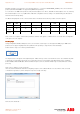
The following tables show the pinouts of the various products for each connection type:
Connection
Type
NextMove e100 /
ES / ESB -2
MicroFlex e150 MicroFlex e100 /
MotiFlex e100
AC500 AC500 Eco CP600
RS232
1 : Shield
Not Available Not Available
1 : Shield
Not Available
1 : GND
2 : RXD 2 : TXD 2 : Not Used
3 : TXD 3 : Not Used 3 : TXD
4 : Not Used 4 : RTS 4 : RXD
5 : GND 5 : GND 5 : Not Used
6 : Not Used 6 : +5v (see note 2) 6 : +5v (see note 3)
7 : RTS 7 : RXD 7 : CTS
8 : CTS 8 : Not Used 8 : RTS
9 : DGND 9 : CTS 9 : Not Used
RS422
1 : Not Used 1 : TXA/+
Not Available Not Available Not Available
1 : GND
2 : RXB/- (see note 4) 2 : TXB/- 2 : Not Used
3 : TXB/- 3 : GND 3 : TX-
4 : Not Used
4 : 7v out (see
note 1)
4 : RX- (see note 4)
5 : GND
5 : RXA/+ (see
note 4)
5 : Not Used
6 : Not Used
6 : RXB/- (see
note 4)
6 : +5v
7 : TXA/+ 7 : RX+ (see note 4)
8 : RXA/+ (see note
4)
8 : TX+
9 : Not Used 9 : Not Used
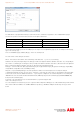
RS485 Not Available
1 : A+ (see note
5)
1 : A+ (see note 5) 1 : Shield 1 : Shield 1 : GND
2 : B- (see note
5)
2 : B- (see note 5) 2 : Not Used 2 : Not Used 2 : Not Used
3 : GND 3 : GND 3 : + (see note 5) 3 : + (see note 5) 3 : - (see notes 5,6)
4 : 7v out (see
note 1)
4 : 7v out (see note
1)
4 : Not Used 4 : Not Used 4 : - (see notes 5,6)
5 : not used 5: Not Used 5 : GND 5 : GND 5 : Not Used
6 : not used 6 : Not Used 6 : +5v (see note 2) 6 : +5v (see note 2) 6 : +5v
7 :Not Used 7 :Not Used 7 : + (see notes 5,6)
8 : - (see note 5) 8 : - (see note 5) 8 : + (see notes 5,6)
9 : Not Used 9 : Not Used 9 : Not Used