
User Guide




15
Connecting power supply
WARNING ►Please use extra caution when connecting the power cord, as
incorrect or faulty connections may result in fi re and/or electrical shock.
• Only use the power cord that came with the projector. If it is damaged, contact
your dealer to newly get correct one.
• Only plug the power cord into an outlet rated for use with the power cord's
specifi ed voltage range.
• Never modify the power cord.
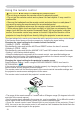
1.
Connect the connector of the power cord to the AC inlet of the projector.
2.
Firmly plug the power cord's plug into the outlet.
C
R
/P
R
C
B
/P
B
AUD
IO
IN2
A
U
DIO IN
1
RG
B IN
1
RG
B IN2
S
D
C
A
R
D
A
U
X
I
/O
D
C
5
V
0
.5
A
LAN
C
O
N
T
R
O
L
R
GB
OU
T
AU
D
IO O
UT
U
SB
V
ID
EO
S
-V
IDEO
AC IN
Setting up
AC inlet
Connector
of the power cord