
User's Manual




Travel Document Reader User Guide DT-01715C
© 3M 2006 All rights reserved.
12
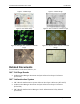
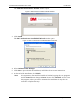
Figure 16: Files Needed window
2. Click Browse and locate the folder.
A dialogue box opens.
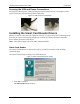
3. Locate the “USB Smart Card Driver” folder in the “3M Document Authenticator” folder
created during software installation.
4. Click Open.
The dialogue box closes.
5. Click OK to complete the installation.
Verifying the USB Driver Installation
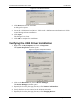
1. Right-click on My Computer and click on Properties.
The System Properties window opens.
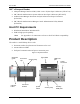
Figure 17: System Properties window
2. Click on the Hardware tab, then on Device Manager.
The Device Manager window opens.
3. Expand (click on the plus sign) the entry called Smart Card Readers.
4. Verify that there are two entries for the SCR331-DI reader.
5. Expand (click on the plus sign) the entry called Imaging Devices.