
User's Manual




DT-01715C Travel Document Reader User Guide
© 3M 2006 All rights reserved.
11
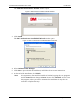
Figure 14: Files Needed window
2. Click Browse.
A dialogue box opens.
3. Locate the “USB Smart Card Driver” folder in the “3M Document Authenticator” folder
created during software installation.
4. Click Open.
The dialogue box closes.
5. Click OK to complete the installation.
Contactless Reader
The Contactless Reader Driver allows the reader to accurately read contactless chips.
The system automatically prompts you to install the driver.
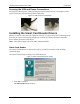
Figure 15: Contactless Reader Driver Prompt
1. Click Yes to continue.
The Files Needed window opens.