
User's Manual




Travel Document Reader User Guide DT-01715C
© 3M 2006 All rights reserved.
8
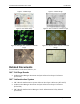
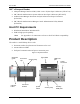
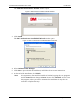
The Authentication Software Installer window opens.
Figure 9: Authentication Software Installer window
3. Click Install.
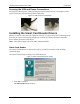
The 3M™ Authenticator InstallShield Wizard window opens.
Figure 10: 3M™ Authenticator InstallShield Wizard window
4. Select Authentication Manager.
5. Click Next to proceed with the installation, and follow the on-screen instructions.
6. At the end of the installation, click Finish.
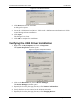
Note: It is important to wait until the Installer is finished copying the core programs
and the Cancel button changes to Done. Do not click CANCEL or X to close
this program, unless you want to terminate the installation. It may take 30
seconds to complete this step.