
User's Instructions




18
Do not alter or repair the electronic components of the facepiece beyond the scope of these
instructions. Use only 3M Scott approved parts.
i IMPORTANT NOTE
The rubber tube on the MCU microphone is not sold as a service part. If the MCU microphone
tube is damaged, replace the MCU (P/N 201625-01).
i IMPORTANT NOTE
For instructions to clean or repair the facepiece, see the operating and maintenance instructions
provided with the facepiece. For configurations with RDI or Scott Sight, blowing air directly into
microphone tube may cause damage to microphone. Shake excess water from the tube or tap
on the tube to disperse water droplets.
For instructions to clean or repair the battery charger, see Cleaning and Repairing the Battery
Charger.
To change the battery
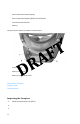
1) On the bottom on the facepiece, locate the battery compartment latch in front of the
power button.
2) Using your thumb, slide the latch toward the outside of the facepiece. The battery
disengages.
3) Inspect the battery contacts. Ensure that they are clean and that the area around them
is free of debris.
4) Insert a charged battery into the battery compartment, starting at the end opposite the
battery compartment latch. Upon proper insertion of the battery, you will hear a click.
Charging the Battery
The battery charger is a key component of the facepiece electronics system. The charger has 2
battery bays and can charge 2 batteries simultaneously. You can connect ("daisy-chain") up to
3 chargers to charge as many as 6 batteries simultaneously.