
Instruction Manual


6
1.0 Operation
;
First time or infrequent users of Comfort Grip Connected (CGC) Hooks should review the “Safety Information” at the
beginning of this manual prior to use of the CGC Hook.
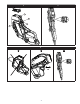
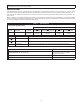
1.1 On-Board User Interface: The Comfort Grip Connected (CGC) Hook has a two-color Multi-Directional LED Display to
indicate the status of the CGC Hook (see Figure 3). Additional wireless connectivity enables communication of status and
usage data to the 3M Connected Equipment app on a Bluetooth mobile device. These electronic functions provide users
and on-site safety professionals feedback during and after use of the CGC Hook.
;
Feedback provided from the electronics on the CGC Hook is not a substitute for situational awareness and safe work
practices. Do not rely on electronic device feedback as a substitute for required safety procedures, product inspection,
or monitoring of personnel working at height.
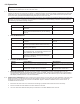
• Red LED Blink Patterns:
Reason Occurs When... Blink Pattern
Tie-Off Alert Only one hook is tied off and its Gate Release is
depressed.
Fast Blink for 5 Seconds
Electronic Failure Electronics have failed the Power-On Self Test. The
Sensing and Alert Mechanism may not be working
properly.
Long, Slow, Repeating Blinks
• Blue LED Blink Patterns:
Reason Occurs When... Blink Pattern
Low Battery Battery level has fallen below the “Replace Now”
threshold.
Quick Blink, Repeating Every Three
Seconds
Enter Deep Sleep Hook electronics are going into Deep Sleep Mode (no
gate activity sensed on either hook for one hour).
One Quick Blink
Exit Deep Sleep Hook electronics have come out of Deep Sleep Mode
(due to a gate opening).
Two Quick Blinks
BLE Connection A Bluetooth connection has been established with
the companion hook, or a Bluetooth connection has
been established with the phone app.
One blink, 1 Second Duration
Calibration Anchor Sensor baseline calibration is complete.
Calibration is initiated by opening and closing the
Gate Release ve times.
Five Short, Rapid Blinks
• Red/Blue LED Blink Patterns:
Reason Occurs When... Blink Pattern
Fall Alert At least one of the hooks has detected a fall. Red and Blue Continuous Alternating
Blink
Cold Start Battery is connected. Indicates Cold Start and
conrms Red and Blue LEDs are functional.
One Quick Blue Blink, followed by
One Quick Blink of Both LEDs.
• Bluetooth Connectivity: Wireless connectivity enables communication of status and usage data to the 3M
Connected Equipment app on a Bluetooth mobile device. For details, contact a 3M Customer Service representative
(see back cover). When a Bluetooth connection is established, the Blue LED Indicator Light on the Multi-Directional
LED Display will ash once for a one-second duration.
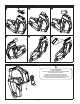
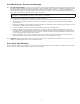
1.2 Anchor Sensor Calibration: On rare occasions, the Anchor Sensor of a CGC Hook may lose calibration. If the CGC Hook
blinks and shows a Tie-Off Alert whenever the Gate Release is pressed, even when the CGC Hook is not connected to
anchorage, the Anchor Sensor may need to be recalibrated. Figure 4 illustrates calibration of the Anchor Sensor. To
recalibrate the Anchor Sensor:
1. Ensure that the CGC Hook is not connected to anchorage (no metal anchor inside the bowl of the hook).
2. Press and release the Gate Release ve times within two seconds.
3. The CGC Hook’s Blue LED will ash quickly several times to conrm calibration has occurred.