
User's Manual





32 75-0500-4450-4 C, 060-A
To un-secure items only
The following steps will un-secure an item without sending the item ID to the
library circulation system.
1 Go into Check-out mode:
For the Standard configuration:
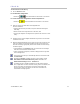
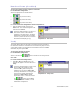
§ Select the button.
§ Select the (Send ID) button to turn off sending IDs. You
will receive the messages “Present items and Un-secure Only.” Follow
the instructions on the screen.
For Local and Remote configurations with the Companion UI:
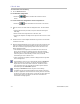
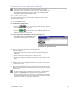
§ Click Un-secure only in the Operations
menu and follow the instructions on the
screen.
Companion UI - Operation menu
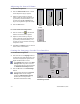
2 Place an item on the deck within the designated area. The item should
be:
§ touching the back wall (for books, the spine should be touching the
back wall),
§ within or inside of the edge sensors on the deck, and
§ covering two adjacent non-edge sensors (sensors that are next to each
other).
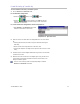
3 Position the item until the digital identification tag is read or the bar code
is under the scan line.
4 When the bar code is scanned or the digital tag is read, you will hear a
thump sound, which indicates that the security strip in the item was un-
secured.