
User's Manual





75-0500-4450-4 C, 060-A 9
Digital Staff Workstation Configurations
There are three Digital Staff Workstation configurations.
Please note your system's configuration. Certain information in this
guide is specific to configuration. This is noted throughout the guide.
Standard Configuration
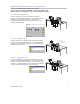
In this configuration, the main user interface controls the
functions of the Digital Staff Workstation. The circulation system
software runs on the library computer. The Digital Staff
Workstation computer and the library computer communicate
through a hardware wedge.
Hardware
Wedge
Library
Computer
Electronics
Enclosure
Upper Unit
Local Configuration
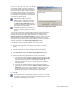
In this configuration, the Companion user interface controls the
functions of the Digital Staff Workstation. The circulation system
software and the Companion software are installed on the Digital
Staff Workstation computer.
Electronics
Enclosure
Upper Unit
Monitor Options:
1.Customer supplied
2.12-inch LCD touchscreen
(mounted on upper unit)
3.15-inch standalone LCD
monitor
Remote Configuration
In this configuration, the Companion user interface controls the
functions of the Digital Staff Workstation. The circulation system
software and the Companion software are installed on the library
computer. The library computer and the Digital Staff Workstation
computer communicate through a network connection.
Electronics
Enclosure
Upper Unit
KVM
Switch
Box
Library
Computer
Network
Connection