
User's Manual


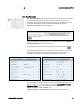




Table Of Contents
- Preface
- Table of Contents
- Reader Overview
- Reader Equipment Installation
- Reader Startup Tool (RST) Software Installation
- Reader Operation
- Reader Startup Tool (RST)
- Embedded Reader Configuration Tool (RCT)
- Configuring Digital Inputs and Outputs
- Specifications
- Reader Specifications (General)
- Reader Specifications (FCC)
- Environmental Specifications
- Power Supply Specifications
- RS-232 Specifications
- Ethernet LAN Specifications
- Antenna Cable Specifications
- External Antenna Specifications (FCC)
- Bulkhead Connector/Interface Cable Pinout
- Battery Specifications (Optional)
- Safety Instructions
- Disposal of the IDentity 5200 Reader
- Reader Maintenance

1 2 3 4 5
6
7 8 9
Reader Configuration Tool
42
IDentity 5200 User Guide
Set Regulatory Mode (Region)
This page allows the user to configure the reader to meet the regulatory
requirements for the geographic region where the reader is deployed. The
sub-region sets the secondary regulatory mode for the geographic region
where the reader is deployed.
For detailed information on each of these parameters, refer to the
IDentity 5200 Protocol Reference Guide. Descriptions are provided in the
setup.region and setup.sub_region configuration variable
sections.
Region Selection
The reader is
configured at the
factory to operate
within a specific
regulatory region. As
a result your region
selections may be
different from those
shown in this
manual.
Note that Region
Selection is not user
configurable.