
User's Manual


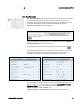




Table Of Contents
- Preface
- Table of Contents
- Reader Overview
- Reader Equipment Installation
- Reader Startup Tool (RST) Software Installation
- Reader Operation
- Reader Startup Tool (RST)
- Embedded Reader Configuration Tool (RCT)
- Configuring Digital Inputs and Outputs
- Specifications
- Reader Specifications (General)
- Reader Specifications (FCC)
- Environmental Specifications
- Power Supply Specifications
- RS-232 Specifications
- Ethernet LAN Specifications
- Antenna Cable Specifications
- External Antenna Specifications (FCC)
- Bulkhead Connector/Interface Cable Pinout
- Battery Specifications (Optional)
- Safety Instructions
- Disposal of the IDentity 5200 Reader
- Reader Maintenance

1 2 3 4 5
6
7 8 9
Reader Configuration Tool
40
IDentity 5200 User Guide
Setup Digital Accessories
The Setup Digital Accessories function allows you to configure the Digital
Inputs and Outputs on the reader.
Digital Input
The status of the four digital input values (1–4) can be seen in this window.
The
Current Value
is not configurable and is shown as
true
or
false
. The
Debounce value can be set and is in milliseconds.
Digital Output
The output value for each digital output can be set to true or false. Press
the
Submit
button to send the appropriate commands to the reader to
update the digital inputs and outputs.
Refer to the IDentity 5200 Protocol Reference Guide for more information
on configuring the digital inputs and outputs.