
User's Manual


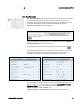


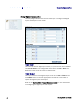


Table Of Contents
- Preface
- Table of Contents
- Reader Overview
- Reader Equipment Installation
- Reader Startup Tool (RST) Software Installation
- Reader Operation
- Reader Startup Tool (RST)
- Embedded Reader Configuration Tool (RCT)
- Configuring Digital Inputs and Outputs
- Specifications
- Reader Specifications (General)
- Reader Specifications (FCC)
- Environmental Specifications
- Power Supply Specifications
- RS-232 Specifications
- Ethernet LAN Specifications
- Antenna Cable Specifications
- External Antenna Specifications (FCC)
- Bulkhead Connector/Interface Cable Pinout
- Battery Specifications (Optional)
- Safety Instructions
- Disposal of the IDentity 5200 Reader
- Reader Maintenance

1 2 3 4 5
6
7 8 9
Reader Configuration Tool
IDentity 5200 User Guide
39
General Settings
allow you to specify the host and domain name of the
reader. The Command and Event Ports are also shown and are read-only.
IPv4/IPv6 Settings
allow you to configure the reader’s IP address. If the
reader is to automatically acquire its IP address, subnet mask and default
gateway from a DHCP server, select
Enable DHCP
. To manually specify this
information, deselect
Enable DHCP
and fill in the desired IP address,
subnet mask and default gateway.
Other Settings
allow you to configure the NTP servers the reader can
contact to obtain the current time, DNS servers the reader can contact for
domain name resolution, and the Domain list to resolve names to IP
addresses.
Enter all the required information and press
Submit
.
Setup Serial Port
The Setup Serial Port function allows you to configure the serial port
parameters. These parameters include:
h Baud rate
h Data bits
h Parity
h Echo
h Stop bits
Use the pull-down menus to select a value and press
Submit
to update the
reader.