
User's Manual


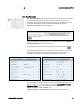


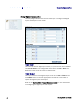


Table Of Contents
- Preface
- Table of Contents
- Reader Overview
- Reader Equipment Installation
- Reader Startup Tool (RST) Software Installation
- Reader Operation
- Reader Startup Tool (RST)
- Embedded Reader Configuration Tool (RCT)
- Configuring Digital Inputs and Outputs
- Specifications
- Reader Specifications (General)
- Reader Specifications (FCC)
- Environmental Specifications
- Power Supply Specifications
- RS-232 Specifications
- Ethernet LAN Specifications
- Antenna Cable Specifications
- External Antenna Specifications (FCC)
- Bulkhead Connector/Interface Cable Pinout
- Battery Specifications (Optional)
- Safety Instructions
- Disposal of the IDentity 5200 Reader
- Reader Maintenance

1 2 3 4 5
6
7 8 9
Reader Configuration Tool
IDentity 5200 User Guide
37
Set Tag Protocol
This
Set Tag Protocol
page consists of two forms. The first form (top) allows
you to select which type of tags the reader will acquire or the type of
protocol(s) to utilize on the air interface. Currently, the reader can operate
with either ISO18000-6C (ISOC), ISO18000-6B (ISOB), SuperTag,
ISO10374, EASALARM, or any combination.
Select the check box for the protocol(s) to enable and then press
Enable
Selected Protocols
to activate the protocol.
To configure protocol level parameters, select the protocol button
.
The protocol level parameters are divided into two categories: control and
physical. Control parameters configure the protocol control. Physical
parameters configure the physical air interface for the protocol.
For detailed information on each of the Control and Physical parameters,
refer to Chapter 15 – Modem Namespace of the IDentity 5200 Protocol
Reference Guide. Parameter descriptions are provided in the
modem.protocol.isoc.control
and
modem.protocol.isoc.physical
configuration variable sections.