
User's Manual


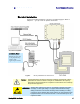


Table Of Contents
- Preface
- Table of Contents
- Reader Overview
- Reader Equipment Installation
- Reader Startup Tool (RST) Software Installation
- Reader Operation
- Reader Startup Tool (RST)
- Embedded Reader Configuration Tool (RCT)
- Configuring Digital Inputs and Outputs
- Specifications
- Reader Specifications (General)
- Reader Specifications (FCC)
- Environmental Specifications
- Power Supply Specifications
- RS-232 Specifications
- Ethernet LAN Specifications
- Antenna Cable Specifications
- External Antenna Specifications (FCC)
- Bulkhead Connector/Interface Cable Pinout
- Battery Specifications (Optional)
- Safety Instructions
- Disposal of the IDentity 5200 Reader
- Reader Maintenance

1
2
3 4 5 6 7 8 9
Reader Equipment Installation
IDentity 5200 User Guide
5
Electrical Installation
A general installation diagram is shown in the following figure. Refer to
Chapter 7 – Specifications for specific information.
Figure 4 IDentity 5200 Electrical Connections
Caution:
The IDentity 5200 is designed to meet the regulatory requirements in those
jurisdictions in which it is offered. Changes or modifications not expressly
approved by Sirit Technologies for compliance could void the user's authority
to operate the equipment.
ATTENTION
IDentity 5200 antenna ports may be susceptible to damage from static
discharge or other high voltage. Use proper Electrostatic Discharge
(ESD) precautions to avoid static discharge when handling or making
connections to the IDentity 5200 reader antenna or communication ports.
Equipment failure can result if the antenna or communication ports are
subjected to ESD.
Installation Notice
Installation of the
IDentity 5200 is only
to be performed by
trained, Sirit
approved personnel.