
User Guide Hub/Switch SuperStack II Switch 1000


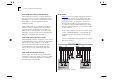
Table Of Contents
- About This Guide
- Getting Started
- Installation and Setup
- Setting Up for Management
- Managing The Switch 1000
- Setting Up Users
- Creating a New User
- Deleting a User
- Editing User Details
- Assigning Local Security
- Choosing a Switch Management Level
- Setting Up the Switch Unit
- Setting Up the Switch Ports
- Setting Up the Switch Database (SDB)
- Setting Up Resilient Links
- Setting Up Traps
- Setting Up the Console Port
- Resetting the Switch
- Initializing the Switch
- Upgrading Software
- Advanced Management
- Status Monitoring and Statistics
- Safety Information
- Screen Access Rights
- Trouble-shooting
- Pin-outs
- Switch 1000 Technical Specifications
- Technical Support
- Glossary
- Index
- 3Com Corporation Limited Warranty
- Electro-Magnetic Compatibility

5
A
DVANCED
M
ANAGEMENT
Virtual LANs (VLANs)
Setting up Virtual Local Area Networks (VLANs) on
the Switch 1000 provides you with less time-
consuming network administration and more effi-
cient network operation.
The following sections explain more about the con-
cept of VLANs and explain how they can be imple-
mented on the Switch 1000.
What are VLANs?
A VLAN is defined as a group of location- and
topology-independent devices that communicate as
if they are on the same physical LAN. This means
that LAN segments are not restricted by the hard-
ware which physically connects them; the segments
are defined by flexible user groups that you create
using software.
With VLANs, you can define your network according
to:
■
Departmental groups
— For example, you can
have one VLAN for the Marketing department,
another for the Finance department, and
another for the Development department.
■
Hierarchical groups
— For example, you can
have one VLAN for directors, another for manag-
ers, and another for general staff.
■
Usage Groups
— For example, you can have
one VLAN for users of e-mail, and another for
users of multimedia.
Benefits of VLANs
Implementing VLANs on your network has three
main advantages:
■
It eases the change and movement of devices on
IP networks
■
It helps to control broadcast traffic
■
It provides extra security