
User Guide Hub/Switch SuperStack II Switch 1000
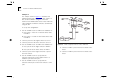
Table Of Contents
- About This Guide
- Getting Started
- Installation and Setup
- Setting Up for Management
- Managing The Switch 1000
- Setting Up Users
- Creating a New User
- Deleting a User
- Editing User Details
- Assigning Local Security
- Choosing a Switch Management Level
- Setting Up the Switch Unit
- Setting Up the Switch Ports
- Setting Up the Switch Database (SDB)
- Setting Up Resilient Links
- Setting Up Traps
- Setting Up the Console Port
- Resetting the Switch
- Initializing the Switch
- Upgrading Software
- Advanced Management
- Status Monitoring and Statistics
- Safety Information
- Screen Access Rights
- Trouble-shooting
- Pin-outs
- Switch 1000 Technical Specifications
- Technical Support
- Glossary
- Index
- 3Com Corporation Limited Warranty
- Electro-Magnetic Compatibility

Resetting the Switch 4-27
Resetting the Switch
If you suspect a problem with the Switch, you can
reset it.
1
From the Main Menu, select the RESET option.
The Reset screen is displayed as shown in
Figure 4-18
.
2
Select OK.
Resetting the Switch in this way is similar to per-
forming a power-off/on cycle. No setup information
is lost.
CAUTION:
Performing a reset may cause some of
the data being transmitted at that moment to be
lost.
Figure 4-18
Reset screen