
User Guide Hub/Switch SuperStack II Switch 1000
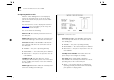
Table Of Contents
- About This Guide
- Getting Started
- Installation and Setup
- Setting Up for Management
- Managing The Switch 1000
- Setting Up Users
- Creating a New User
- Deleting a User
- Editing User Details
- Assigning Local Security
- Choosing a Switch Management Level
- Setting Up the Switch Unit
- Setting Up the Switch Ports
- Setting Up the Switch Database (SDB)
- Setting Up Resilient Links
- Setting Up Traps
- Setting Up the Console Port
- Resetting the Switch
- Initializing the Switch
- Upgrading Software
- Advanced Management
- Status Monitoring and Statistics
- Safety Information
- Screen Access Rights
- Trouble-shooting
- Pin-outs
- Switch 1000 Technical Specifications
- Technical Support
- Glossary
- Index
- 3Com Corporation Limited Warranty
- Electro-Magnetic Compatibility

4-26 C
HAPTER
4: M
ANAGING
T
HE
S
WITCH
1000
Speed
1200 / 2400 / 4800 / 9600 / 19200
This field allows you to select the correct line speed
(baud rate) for your terminal or modem. If you
have enabled auto-configuration, line speed is set
automatically.
Char Size
8
This read-only field shows the character
bit (data bit) size for the Switch. You should set your
terminal to the same value.
Parity
NONE
This read-only field shows the parity
setting for the Switch. You should configure your
terminal to the same setting.
Stop Bit
1
This read-only field shows the stop bit
setting for the Switch. You should configure your
terminal to the same setting.