
User Guide Hub/Switch SuperStack II Switch 1000
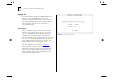

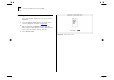
Table Of Contents
- About This Guide
- Getting Started
- Installation and Setup
- Setting Up for Management
- Managing The Switch 1000
- Setting Up Users
- Creating a New User
- Deleting a User
- Editing User Details
- Assigning Local Security
- Choosing a Switch Management Level
- Setting Up the Switch Unit
- Setting Up the Switch Ports
- Setting Up the Switch Database (SDB)
- Setting Up Resilient Links
- Setting Up Traps
- Setting Up the Console Port
- Resetting the Switch
- Initializing the Switch
- Upgrading Software
- Advanced Management
- Status Monitoring and Statistics
- Safety Information
- Screen Access Rights
- Trouble-shooting
- Pin-outs
- Switch 1000 Technical Specifications
- Technical Support
- Glossary
- Index
- 3Com Corporation Limited Warranty
- Electro-Magnetic Compatibility

3-12 C
HAPTER
3: S
ETTING
U
P
FOR
M
ANAGEMENT
Logging Off
If you have finished using the VT100 management
interface, select the LOGOFF option from the
bottom of the Main Menu screen. If you accessed
the VT100 management interface using a Telnet ses-
sion or modem connection, the connection is
closed automatically.
Auto Logout
There is a built-in security timeout on the VT100
interface. If you do not press any keys for 3 min-
utes, the management facility warns you that the
inactivity timer is about to expire. If you do not
press a key within 10 seconds, the timer expires and
the screen is locked; any displayed statistics continue
to be updated. When you next press any key, the
display changes to the Auto Logout screen.
The Auto Logout screen (shown in Figure 3-5
)
requests you to enter your password again. If the
password is correctly entered, the screen that was
active when the timer expired is displayed. If you
make a mistake entering your password, you are
returned to the Logon screen.
Figure 3-5
Auto Logout screen