
User Guide Hub/Switch SuperStack II Switch 1000
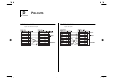
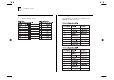




Table Of Contents
- About This Guide
- Getting Started
- Installation and Setup
- Setting Up for Management
- Managing The Switch 1000
- Setting Up Users
- Creating a New User
- Deleting a User
- Editing User Details
- Assigning Local Security
- Choosing a Switch Management Level
- Setting Up the Switch Unit
- Setting Up the Switch Ports
- Setting Up the Switch Database (SDB)
- Setting Up Resilient Links
- Setting Up Traps
- Setting Up the Console Port
- Resetting the Switch
- Initializing the Switch
- Upgrading Software
- Advanced Management
- Status Monitoring and Statistics
- Safety Information
- Screen Access Rights
- Trouble-shooting
- Pin-outs
- Switch 1000 Technical Specifications
- Technical Support
- Glossary
- Index
- 3Com Corporation Limited Warranty
- Electro-Magnetic Compatibility

E
S
WITCH
1000 T
ECHNICAL
S
PECIFICATIONS
Physical Dimensions
Height: 76mm (3.0in.) x Width: 483mm (19.0in.) x Depth: 300mm (12.0in.)
Weight: 4.4kg (9.7lbs)
Environmental Requirements
Operating Temperature 0–50°C (32–122°F)
Storage Temperature -10–70°C (14–158°F)
Operating Humidity 10–95% relative humidity, non-condensing
Standards EN60068 (IEC68)
Safety
Agency Certifications UL 1950, EN60950, CSA 22.2 No. 950
AC Protection 5A Time Delay Fuse
Electromagnetic Compatibility
EN55022 Class B*, FCC Part 15 Subpart B Class A, ICES-003 Class A, VCCI Class 2*, AS/NZS 3548 Class B*,
EN 50082-1
* Category 5 screened cables must be used to ensure compliance with the Class B/Class 2 requirements of
this standard. The use of unscreened cables (Category 5 for 100BASE-TX ports, and Category 3 and 5 for
10BASE-T ports) complies with the Class A/Class 1 requirements.
Heat Dissipation
100W maximum (341 BTU/hour maximum)
Power Supply
AC Line Frequency 50–60 Hz
Input Voltage Options 100–120 / 200–240 VAC
Current Rating 3A (maximum) at 100 VAC / 2A (maximum) at 200 VAC