
User Guide Hub/Switch SuperStack II Switch 1000
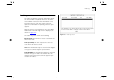




Table Of Contents
- About This Guide
- Getting Started
- Installation and Setup
- Setting Up for Management
- Managing The Switch 1000
- Setting Up Users
- Creating a New User
- Deleting a User
- Editing User Details
- Assigning Local Security
- Choosing a Switch Management Level
- Setting Up the Switch Unit
- Setting Up the Switch Ports
- Setting Up the Switch Database (SDB)
- Setting Up Resilient Links
- Setting Up Traps
- Setting Up the Console Port
- Resetting the Switch
- Initializing the Switch
- Upgrading Software
- Advanced Management
- Status Monitoring and Statistics
- Safety Information
- Screen Access Rights
- Trouble-shooting
- Pin-outs
- Switch 1000 Technical Specifications
- Technical Support
- Glossary
- Index
- 3Com Corporation Limited Warranty
- Electro-Magnetic Compatibility

Fault Log 6-9
Fault Log
The Fault Log displays read-only information about
the Switch which is updated whenever an abnor-
mal condition is detected. This information is for
internal 3Com use only. You may be asked to
quote this information if reporting a fault to your
supplier.
With the Status screen displayed, select the FAULT
LOG button. The Fault Log screen is displayed, as
shown in Figure 6-6
.
The Fault Log screen shows the following:
Reset Count
The number of resets recorded at the
time of the fault.
Time (seconds)
The time elapsed since the last
reset when the fault occurred.
Area
This information may be used for fault diagno-
sis by your technical support representative.
Fault Number
The hexadecimal number in this field
indicates the type of fault. You should note this
number and contact your technical support repre-
sentative for advice.
Figure 6-6
Fault Log screen